
Free Bingo Card Generator & Printable PDF
Make up to 200 custom bingo cards from your word list. Preview, print or save a PDF. No sign-up.
Create your bingo cards · Classroom vocabulary example
One word or phrase per line. Use 24–100 different entries, up to 80 characters each. Uppercase and lowercase copies count as one entry. Each card uses 24 entries and a free center.
One draft per page, stored only in this browser. Saving replaces the previous draft. Restore brings back your text and settings, with a fresh shuffle.
Review the preview. In the print dialog, use 100% scale and turn off headers and footers for a clean page.
Your print preview
Print or save a PDF with all generated cards, even in the compact preview.
Call your bingo game
Print the cards first. Draw one word at a time, then check any winning line against the history below. Keep this tab open during play.
Ready for the first word.
0 called · 30 remaining.
Called words · check a winner
Changing content or generating cards starts a fresh game. Gift and people bingo use their own play rules and do not need a caller.
How to make bingo cards
- Choose a theme or paste at least 24 different entries, one per line.
- Set the number of cards and pick A4 or US Letter. Generate a preview.
- Print or save the PDF. For called-word bingo, open the word caller.
Classroom example and sample PDFs
Create Classroom Vocabulary Bingo with PartyPageKit
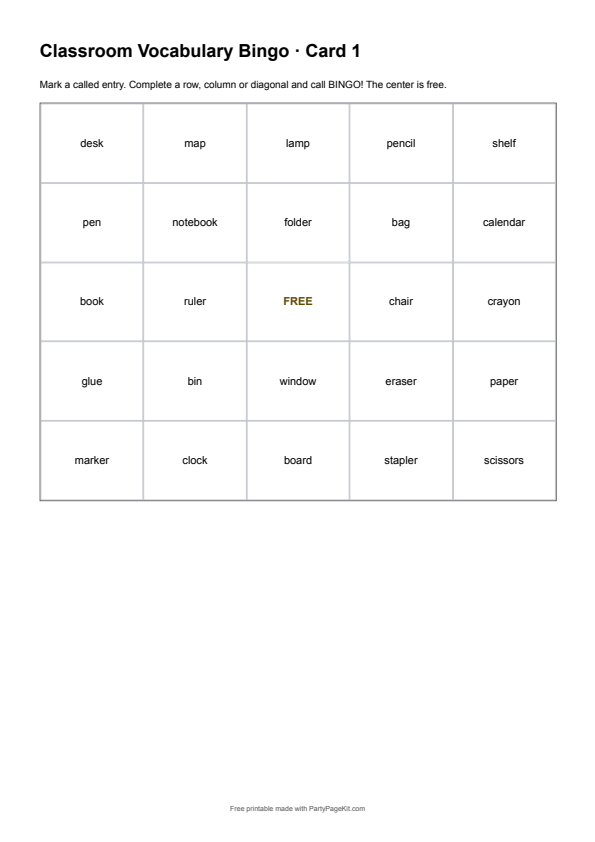
Turn a reviewed word list into different printable cards for a listening-and-reading activity. This worked example uses 25 classroom objects, three player cards and a separate caller checklist. PartyPageKit is free to edit, generate and print, with no account required. The example is a preparation guide, not a classroom-tested lesson or a claim of learning gains.
Ready to print? Download three player cards and a separate host checklist: A4 sample PDF · US Letter sample PDF · Teacher guide PDF.
Want your own word list? Use the example below, then edit it in the maker.
1. Choose the words your learners already know
Read the list together before play. Point to objects or explain unfamiliar words; replace any that do not fit your classroom. This activity suits learners who can read the selected words. The maker uses a fixed 5 × 5 grid with a free center, so it needs at least 24 different entries. It does not make picture cards or smaller grids.
Use these words replaces only the maker’s word list and clears its preview and called-word history. Your title, play style, number of cards and paper settings stay the same.
Replace your current word list? Your preview and called-word history will be cleared. Your other settings will stay the same.
You can also select and copy the list manually, then paste it into Your editable content in the card maker above. You can also download the word list. Edit the maker's input, rather than this read-only example.
2. Generate one different card per player
- Set Card title to Classroom Vocabulary Bingo.
- Paste the list into Your editable content. Choose Called words as the play style.
- For a trial, set Number of cards to 3 and choose One card per page. For your class, generate the actual number of player cards you need, up to 200.
- Select A4 or US Letter, then choose Generate preview.
Each card contains 24 of the 25 words and a free center, in a different arrangement. Check three card headings and compare the grids. Printing three copies of one card does not create three different cards. Keep a saved PDF if you need to reprint the same arrangements later.
3. Check and print your materials
Choose Print / Save PDF. Match the paper size in the print dialog, use 100% scale and turn off browser headers and footers. Save a PDF first and inspect every page. The sample below has three player pages and one host page; larger sets and other layouts can have different page counts. Print the host checklist for yourself, not as a fourth player card.
Download the A4 sample pack (PDF) · Download the US Letter sample pack (PDF) · Download the two-page teacher guide (PDF)
4. Run a short practice round
Give each player one card and a pencil or counters. Agree that one completed row, column or diagonal wins; the center is free. Model one call before starting. Say the exact printed word, pause for marking and repeat the same word when requested. With 25 words in the pool, one word will be absent from each card; a player should leave the card unchanged if a call is not on it.
Use Call next word and keep the called-word history visible to the host, or read from the printed checklist and tick each call. Pressing the next-word button draws a new entry; it is not a repeat button. Keep the current set unchanged during the round: editing the content or generating again resets the game.
When someone calls bingo, check every word in the claimed line against the actual calls. Different cards can still win together, so agree beforehand to accept shared winners. Offer a seated, untimed version and show written calls if that helps participation. Finish by revisiting two unfamiliar words; winning a bingo line is not an assessment of vocabulary mastery.
Optional meaning-based variation
Prepare and review your own clues before play: “A tool for measuring length” → ruler; “An object that tells the time” → clock; “A container for rubbish” → bin. Avoid “Something you write with”, because pen, pencil, marker and crayon could all fit. The tool does not create or check clues. Tell learners whether you are calling exact words or definitions and keep that rule consistent.
Prepared by PartyPageKit, 10 November 2026. Samples were generated with the existing maker and checked as PDFs; physical printer output and classroom learning outcomes were not tested. Use the materials for personal, classroom and internal-event activities under our site terms.
Hosting, printing and troubleshooting
Plan a called-word bingo round
Choose at least 24 different entries, then generate one shuffled card per player, up to 200 cards. Tell guests whether a row, column or diagonal wins. The center is free. Call one entry at a time and keep the history or printed checklist with the host. Check a claimed winning line against words already called. Different arrangements do not prevent simultaneous winners, so agree in advance whether guests share a win or play another round. Gift-opening and find-someone-who modes use different rules and do not need the called-word checklist.
What words should I start with?
For a birthday, try cake, candles, balloons, ribbon and favorite snacks. For a team gathering, use familiar tools, hobbies or everyday experiences. Gift bingo should use gift categories that fit the event. Human bingo works best with voluntary, comfortable conversation prompts. The theme menu supplies editable examples; choose the mode that matches the activity.
Print a small test before the event
Select Letter or A4 in the maker, then select the same paper in your browser’s print dialog. Start at 100% scale and turn off the browser’s headers and footers. Save a PDF first if you want to check the page breaks or share a copy with another host. Print one sample before making a full set. If words are crowded, shorten the wording rather than shrinking every card until it is difficult to read. Check that cutting lines and writing spaces are still usable.
Prepare for the people attending
Read every prompt before the gathering. Replace unfamiliar words, avoid private personal information, and let people pass without an explanation. Longer text may need larger cards or an adult reading aloud. Choose a seated format if moving around would make participation difficult. These tools format the examples or the text you supply; they do not judge whether an activity suits your guests. A quick practice round helps the host spot ambiguous instructions before everyone starts.
Frequently asked questions
Do I need an account or a paid plan?
No. Editing, generating and browser printing are free. The maker does not upload your editable game content to a server.
Can I keep my edits for later?
Use Save text to download your words, or Save draft on this device where offered. A local draft belongs to this browser and page; it is not an account backup. Clearing site data removes it. Restoring a draft generates a fresh arrangement, rather than preserving the previous draw pile or live progress.
What kind of bingo cards can I make?
This is a text-based maker for word, gift-opening and find-someone-who bingo. Every card uses the same 5×5 format with a free center. You can type numbers as entries, but the maker does not arrange them into traditional B–I–N–G–O number ranges. It does not offer image uploads or smaller grid sizes.
How do I download a PDF?
Choose Generate preview, review the cards, then choose Print / Save PDF. In your browser’s print dialog, select Save as PDF or the PDF option available on your device. Match the paper size to A4 or US Letter. This uses browser printing rather than a separate PDF download button.
Can I use another language?
You can type your own language into the English-interface maker. Preview the result before printing: longer phrases may need a larger layout, and font availability depends on your device.
Plan the gathering around this game
Keep Spoken Bingo Calls Consistent with Printed Words
Decide what listeners are matching
Before using the Bingo card generator for an English listening round, decide whether you will say the printed word itself or give a teacher-prepared clue. Those are different tasks. Hearing “basket” and finding basket tests a direct sound-to-text match. Hearing a description and selecting basket adds a meaning decision. Tell players which task applies before the first call. Do not switch between exact words and improvised clues whenever the room becomes quiet, since the uncertainty would then come from changing instructions rather than the language you intended to practise.
Keep the actual card format in view
This maker produces five-by-five cards with a free centre and twenty-four word positions. It requires at least twenty-four distinct entries. A six-word rehearsal is therefore preparation, not a complete input list for this generator. The British Council sound-bingo activity uses a different handwritten six-word selection. Its example shows a listening task, but does not mean this page has a six-cell setting. If you want that smaller handwritten activity, prepare it separately instead of promising a layout the current maker does not offer.
Rehearse a few complete calls
Choose six entries already present in your full pool, such as basket, spoon, candle, window, apple and leaf. Say one, pause, and ask a volunteer to point to the same written entry. This brief rehearsal can expose an unfamiliar spelling before cards are distributed. It does not establish that the class has mastered the vocabulary. Keep the exact spelling on the card and host list aligned. If the printed item is leaf, do not announce leaves without explaining the variation, especially when the round is intended to practise recognising the written form.
Prepare clue answers outside the tool
For a meaning-based variation, write a private clue beside its exact intended entry. “A small utensil used to eat soup” can point to spoon within an appropriate reviewed pool. “Something used at dinner” is too broad if the pool also includes plate, cup and napkin. Check the answer against the entire pool, not only the six rehearsal words. The maker arranges supplied entries; it does not automatically create or validate definition clues. If two entries remain defensible, revise the clue before play rather than requiring learners to guess the teacher's preferred interpretation.
Separate repeating a call from drawing another
After an entry is drawn, read that same entry again if someone needs a repeat. Pressing the next-word control instead would advance the draw and create another call. Keep the current entry and history available to the host, and allow time for marking before moving on. If you use a printed checklist instead of the screen, tick the entry when it is announced. Repeating its pronunciation does not create a second independent item on that checklist. These small distinctions make the record usable when a player later asks which words were actually called.
Make support visible without changing the answer
A host can show the current written entry after reading it aloud, or ask a helper to display it. That offers a different level of support from an audio-only round, so describe the choice honestly. It does not need to be scored as an error. A participant may also follow along without racing for a line. If a hearing or reading difficulty makes the proposed format awkward, choose another way to join the round instead of treating a missed mark as evidence about ability. The immediate observation is whether the announced item and recorded mark correspond.
Finish by checking the language task itself
After checking a claimed line against the actual calls, revisit one or two entries that caused uncertainty. Ask whether the problem was pronunciation, an unfamiliar printed word, an ambiguous clue or an accidental extra draw. Those lead to different repairs. Save the reviewed word list if you need it later, but remember that restoring a local draft starts a fresh arrangement rather than preserving the current draw. End with a short, accurate record of what was practised. Winning a chance-based line is not a measurement of lasting improvement in listening or vocabulary.
Count Distinct Bingo Boards Before Printing Copies
Prepare the independent check
A stack of twenty bingo sheets does not necessarily contain twenty different boards. The card-count setting in the Bingo generator creates different arrangements within one generated set. The Copies setting in a printer repeats whatever pages you selected. Those controls solve different jobs. Decide how many players need their own arrangement before opening the print dialog. Increasing printer copies after generating too few boards makes a bigger pile, but it does not create new arrangements or expand the generated set. Write the intended player count beside the approved set before printing.
Suppose twelve players each need one board in a single called-word round. Generate twelve cards, check the preview and print one complete set of player boards. The headings run from Card 1 through Card 12 within that generation. Generating four cards and printing three copies instead produces twelve physical boards with only four arrangements. Each arrangement now has three copies. Players receiving matching copies will have the same winning lines available under the same calls, even though their sheets are separate pieces of paper.
Compare the cases
An extra copy can be useful when someone spills a drink before the round starts. Keep replacement sheets in a separate envelope instead of distributing them as additional different boards. For the four-card example, label the physical copies on the back as set A, B or C if they serve separate tables. Those handwritten set labels are your own organising aid; they do not change the printed squares. If all three tables share one competition, duplicated boards remain duplicated regardless of the label or where participants sit.
Card 1 identifies the first card in the current preview. It is not a permanent identity that recreates the same arrangement whenever you generate again. A fresh generation or restored local draft creates a new shuffle, and the headings begin again. If the approved Card 7 is damaged, reprint that board from the saved approved PDF rather than regenerating seven cards and assuming the seventh will match. Keep any replacement consistent with the current word pool and round. A word-list text file preserves wording, not the exact approved board arrangement.
Audit and use the result
The generated output includes host guidance after the player boards, and called-word mode includes a caller checklist. Count usable player boards rather than assuming every PDF page belongs to a player. One-card and two-card layouts place boards differently, and the host section may occupy additional pages. Inspect the actual PDF before selecting a page range or ordering copies; this note does not promise a fixed total page count. Print the host material for the host, then deal the checked player boards once each. Use the same final set throughout the round.
Before guests arrive, make a list of the current card headings and tick each when dealt. For twelve players, the first deal should show twelve different headings from the same approved generation. If two sheets both say Card 4, compare their grids: they may be duplicate prints, or may have come from different generations whose headings restarted. Resolve the mix before calling starts. Keep the approved PDF with the paper pack so a helper can inspect what was actually generated without editing the maker during play.
Print-Bingo.com's printing guidance also distinguishes new cards from repeated copies; our distribution example applies that distinction to this maker's controls. Different arrangements still can win on the same call, so retain the agreed tie procedure in the custom Bingo rules. This preparation check prevents accidental duplicate dealing. It does not promise a single winner, calculate winning probabilities or validate whether particular vocabulary suits a class. Review the words and the actual printed result separately.
Advertisement
Choose whether to load a banner from Adsterra. When loaded, Adsterra receives your IP address and browser information and may use cookies. See the Adsterra privacy policy.